English हिन्दी
Connect with us

Education

Jawahar Navodaya Vidyalaya result out for class 6, 11, here’s direct link for provisional list

JNV Result 2021: Meanwhile, the provisional select list for class 11 is out, and this list has been released for different regions and students can check their names in the list according to their region.

Published

on

result JNV

Navodaya Vidyalaya Samiti has not released the much-awaited result of the Jawahar Navodaya Vidyalaya Result 2021 for Class 6 and 11. The link to the class 6 and 11 results are available on the official website of Navodaya Vidyalaya that is navodaya.gov.in.

The result link class 6 was released on September 27 but the link is not yet active, and there is no official note on the same about when the link will be made active. There is no official confirmation yet about when the students will be able to access the link.

Meanwhile, the provisional select list for class 11 is out, and this list has been released for different regions and students can check their names in the list according to their region. According to the Navodaya Vidyalaya Samiti, admission to the student in class 11 will be given based on their class 10 mark sheet and their performance.
How to check Class 6 Result 2021?

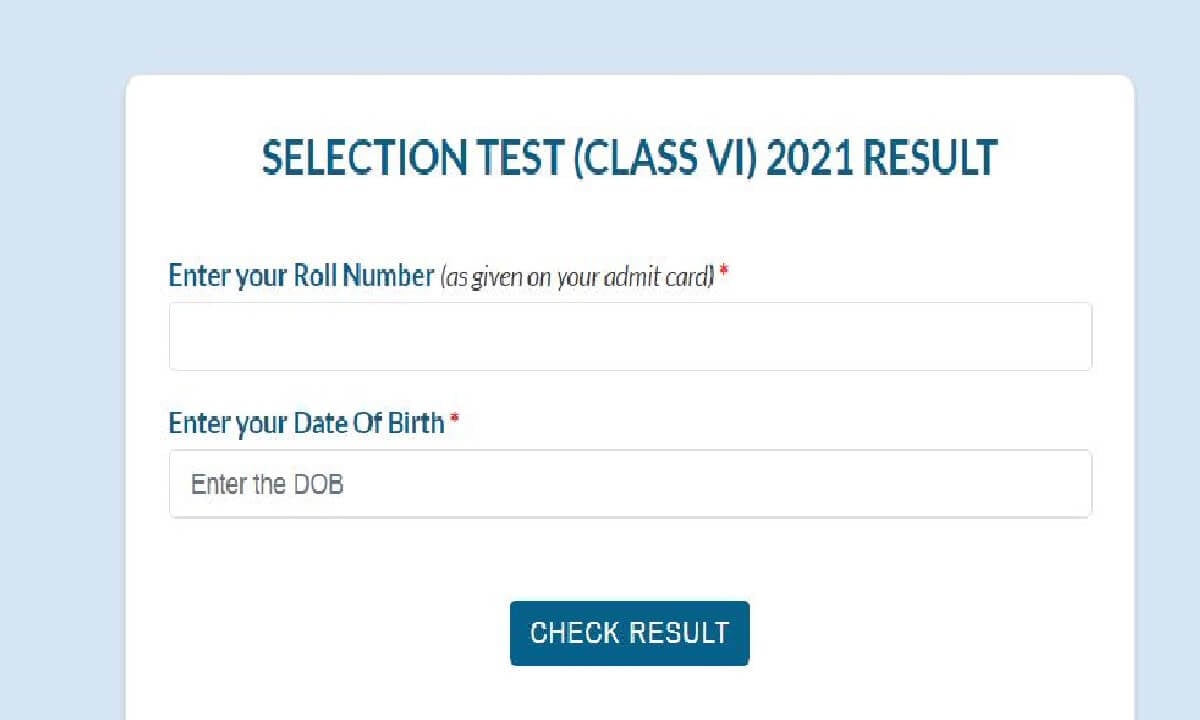
Step 1: You need to click on this link– SELECTION TEST (CLASS VI) 2021 RESULT

Step 2: Now, you need to enter your roll number and your date of birth.

Step 3: After this, you need to click on the check result option, and you will be able to check your result.

Step 4: You can take a hard copy of the result for future use.

Also Read: Kanhaiya Kumar, Jignesh Mevani to join Congress today, posters put up outside party office in Delhi

The entrance examination of JNV class 6 took place on August 11, 2021, and the result of the same will be out soon. It is reported that more than 20 lakh candidates applied for this. However, the numbers are not released yet that how many students appeared for the examination. After the release of the result, the Navodaya Vidyalaya Samiti will also release a cut-off list for different categories. According to reports, this cut-off will be the minimum marks required to be eligible for class 6 admission.

Education

UGC NET June 2026 admit card released; candidates can download hall tickets online

The National Testing Agency has released UGC NET June 2026 admit cards. Candidates can now download their hall tickets from the official website before the examination begins on June 22.

Published

on

The National Testing Agency (NTA) has released the admit cards for the UGC NET June 2026 examination. Registered candidates can now download their hall tickets from the official UGC NET portal by logging in with their application credentials. The examination is scheduled to be conducted between June 22 and June 30, 2026.

The admit card is a mandatory document for entry to the examination centre and contains important details such as the candidate’s name, roll number, examination date, reporting time and allotted test centre. Candidates have been advised to carefully verify all information mentioned on the document after downloading it.

How to download the UGC NET admit card

Candidates can follow these steps to access their hall tickets:

  1. Visit the official UGC NET website.
  2. Click on the admit card download link.
  3. Enter the application number, date of birth or password, and security details.
  4. Submit the information to log in.
  5. Download and save the admit card.
  6. Take a printout for use on the examination day.

Important instructions for candidates

Candidates must carry a printed copy of the admit card along with a valid photo identity proof to the examination centre. The city intimation slip issued earlier is meant only for advance travel planning and cannot be used as a substitute for the admit card.

Applicants are also advised to check reporting timings, examination guidelines and centre details mentioned on the hall ticket well in advance to avoid last-minute issues.

Continue Reading

Education

NEET UG 2026 scam allegation: Brokers accused of offering government medical seats through OMR sheet manipulation

A fresh complaint has alleged that brokers promised government medical college admissions by manipulating NEET UG 2026 OMR sheets in exchange for large payments.

Published

on

NEET Exam

The controversy surrounding NEET UG 2026 has taken a new turn after allegations surfaced that a group of brokers was offering admission to government medical colleges by manipulating candidates’ OMR answer sheets for a hefty payment. The claims come at a time when the medical entrance examination is already under intense scrutiny following the paper leak row and the subsequent decision to conduct a re-examination.

According to reports, a candidate from Gujarat approached authorities after allegedly being contacted by intermediaries who claimed they could secure enough marks for admission to a government medical college by tampering with OMR sheets. The alleged demand was around Rs. 20 lakh per candidate.

Alleged racket avoided promises of top ranks

The complainant claimed that the brokers did not offer unrealistically high scores or top ranks. Instead, they allegedly promised to increase marks only to the extent required for securing admission to a government medical college, a strategy reportedly designed to avoid raising suspicion during scrutiny.

The matter has reportedly been brought to the attention of the Gujarat Cyber Crime Cell through a written complaint, prompting calls for a detailed investigation into the claims.

OMR manipulation concerns have surfaced before

The allegations have renewed concerns about the security of OMR-based examinations. In recent years, courts and investigating agencies have examined multiple cases involving alleged OMR manipulation linked to medical entrance examinations. The Gujarat High Court recently observed that allegations in a NEET-UG 2024 OMR manipulation case warranted a full trial after investigators claimed students’ answer sheets were altered to inflate scores.

Authorities have also previously received complaints from candidates alleging discrepancies in uploaded OMR sheets, though such claims have been disputed by examination authorities in several instances.

NEET UG 2026 already facing scrutiny

The latest allegations come against the backdrop of the wider NEET UG 2026 controversy. The examination conducted on May 3 was cancelled following allegations of a paper leak, and a fresh examination has been scheduled for June 21. Multiple investigations are underway, while courts and parliamentary bodies are also examining issues related to the conduct of the exam.

Authorities have not publicly confirmed the OMR manipulation allegations, and investigations are expected to determine whether any such network was actually capable of influencing examination outcomes.

Continue Reading

India News

Kerala LSS USS result 2026: Official website slow? Check how to download scorecard online

The Kerala CM Kids LSS USS result 2026 has been declared online. Here is a comprehensive troubleshooting guide and step-by-step process to download your scorecard if the official portal bpekerala.in is down or unresponsive.

Published

on

Results

The Kerala Public Examination Section has officially announced the Kerala CM Kids LSS and USS result 2026. The scorecard link is live for candidates who sat for the scholarship eligibility examinations conducted in February 2026.

However, shortly after the declaration, several students and parents encountered difficulties trying to log onto the main portal, bpekerala.in. Due to a massive surge in simultaneous traffic from eager candidates, the official website has experienced temporary server slowdowns, loading delays, and intermittent error screens. Media reports indicate that the portal might stay slow during peak hours, but authorities ensure that the result data is perfectly safe and live online.

👉 Click Here to Check Kerala LSS USS Result 2026

Why the Kerala LSS USS result website is slow

Technical glitches right after a major result declaration are quite common due to infrastructural limitations during peak traffic. Some of the primary factors contributing to the current loading errors include:

  • High visitor traffic: Thousands of students trying to load the homepage simultaneously.
  • Server overload: Simultaneous database requests leading to temporary unresponsive servers.
  • Mobile compatibility limitations: Heavy traffic coupled with certain mobile browsers causing slow rendering times.

Step-by-step guide to download Kerala LSS USS result 2026

If you are experiencing slow loading speeds on the primary web server, you can carefully try the following steps to download your marksheet:

  • Step 1: Navigate to the official website at bpekerala.in and let the landing page load completely without interrupting.
  • Step 2: Find and click on the link labeled “CM Kids LSS USS Result 2026” or head directly to the dedicated “Results” tab on the interface.
  • Step 3: Enter your accurate credentials, which include your Registration Number and Date of Birth (formatted as DD/MM/YYYY), precisely as mentioned in your original hall ticket.
  • Step 4: Click on the “Submit” or “View Result” button. If the screen takes time to process, avoid refreshing multiple times as it can block your session.
  • Step 5: Once your breakdown of scores appears on the dashboard, download the digital copy or capture a screenshot, then print a physical copy for any future administrative or school needs.

Alternative links and troubleshooting tips

If bpekerala.in fails to open entirely, candidates are advised not to panic. A backup official digital platform has been set up to ease the main server load. Students can log into pareekshabhavan.kerala.gov.in to access mirrored links for checking their LSS and USS scholarship scores.

Additionally, you can follow these easy technical fixes to bypass server bottlenecks:

  • Clear browser data: Empty your browser cache or open the link using an Incognito/Private window.
  • Change connectivity: Switch your internet connection from mobile data to a stable Wi-Fi connection, or vice versa, to reset data routing.
  • Switch your browser: Try alternative web browsers like Mozilla Firefox or Google Chrome instead of default system web viewers.
  • Check during off-peak windows: Wait for about 15 to 30 minutes and re-attempt during non-peak windows when server traffic naturally drops down.

Continue Reading

Trending

© Copyright 2022 APNLIVE.com